Bookings
Sales Orders were redesigned as the central Booking module for the complete journey.
A complete Zoho-based training management system that automates multi-course bookings, agreements, calendar invitations, invoicing, payments, learner assessments, feedback reports, and certificate delivery.
A complete Zoho-based platform that automates multi-course bookings, agreements, customer and trainer scheduling, Xero invoicing, payment tracking, learner assessments, feedback reports, and certificate delivery.
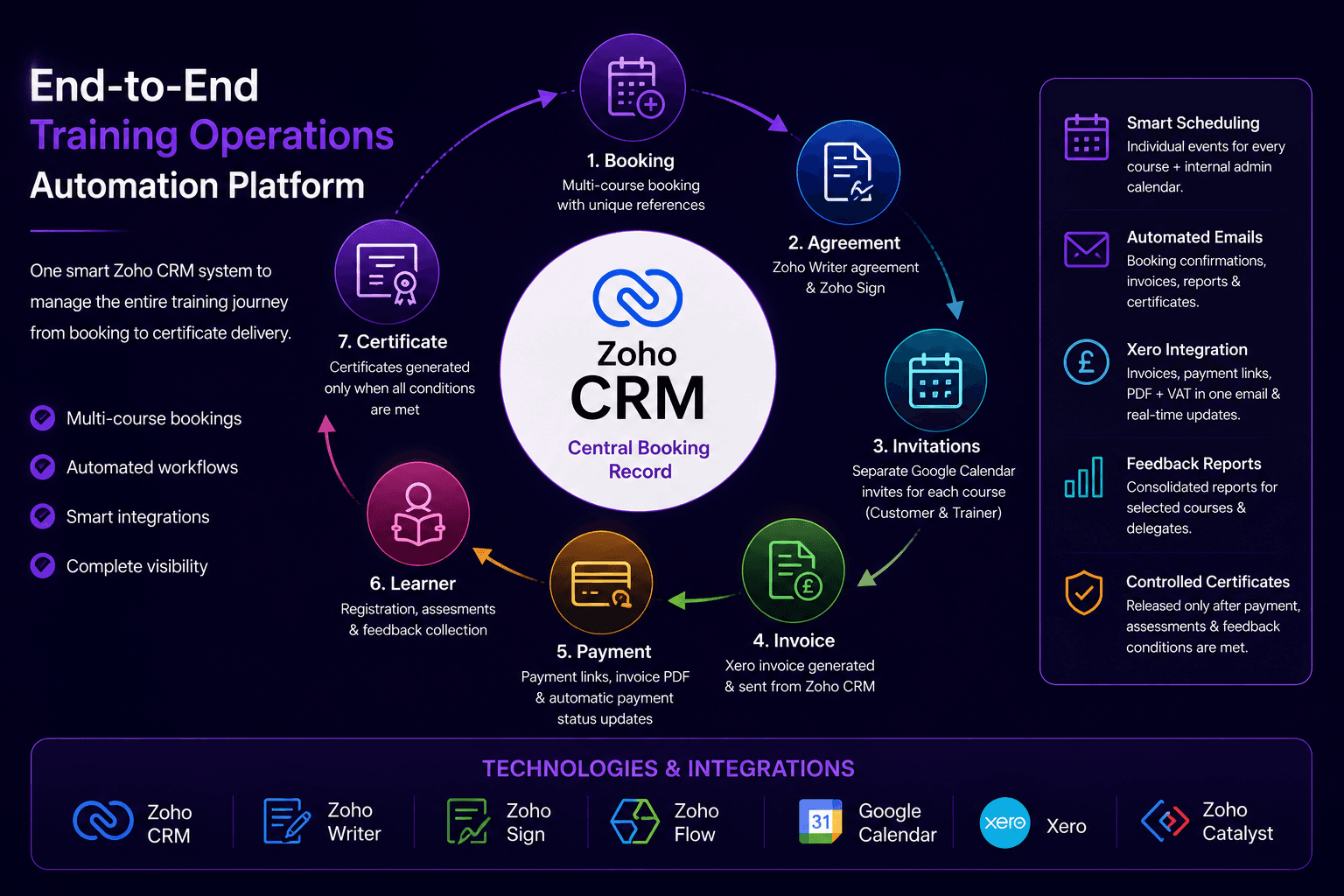
A UK-based professional training provider was managing bookings, agreements, calendars, invoices, learner details, assessments, feedback, and certificates through disconnected manual processes. A single customer booking could contain one course or many courses, each with its own trainer, date, time, venue, price, learners, feedback, and certificates.
I redesigned Zoho CRM so the Booking record became the central operational record for the full training journey, from first booking through final certificate delivery.
Sales Orders were redesigned as the central Booking module for the complete journey.
Accounts and Contacts store customer, billing, invoice, email, and booking-contact details.
Products store course descriptions, prices, CPD hours, validity periods, and standard course data.
Delegates are matched to the correct booking, course, feedback, assessment, and certificate.
Dedicated modules store course feedback and assessment attempts by learner and Course Reference.
One certificate record is created for each learner and course combination.
Every Booking receives a unique Booking Reference. Every course row inside the Booking receives its own Course Reference, such as a booking reference plus a course sequence. The Course Reference is used throughout calendar invitations, trainer instructions, learner registration, feedback, assessments, reports, certificates, and exception handling.
The agreement process uses Zoho CRM, Zoho Writer, and Zoho Sign. Booking, organisation, contact, and course line-item data are merged into a Writer agreement. The system validates the booking before sending, prevents duplicate signature requests, stores the Zoho Sign request ID, downloads the signed PDF after completion, and updates the Booking automatically.
The calendar automation is course-based rather than booking-based. Each course creates one external Google Calendar event for the customer and trainer, plus one separate internal administration event. Event IDs are stored on each course row so events can be updated or cancelled individually from custom CRM widgets.
Zoho CRM prepares the booking and course payload, then Zoho Flow creates the Xero invoice, applies line items and VAT, authorizes the invoice, retrieves the payment link and PDF, and returns the invoice information to Zoho CRM. CRM sends a branded invoice email with the payment link and invoice PDF, while Xero payment updates synchronize back to the Booking.
Learners register and submit feedback using the Course Reference, which prevents records from different courses being mixed together. Low feedback is held for internal review before customer reports or certificates can be released.
I also built a Zoho Catalyst assessment application. Learners complete a ten-question assessment, receive a pass or fail result, and the outcome is stored in Zoho CRM with an assessment PDF.
Custom CRM widgets allow staff to review eligible feedback, generate customer feedback reports, select eligible learners, and send certificates by course. Certificate generation checks the booking, learner, course, assessment result, payment status, feedback holds, CPD hours, and validity period before generating PDFs through Zoho Writer.
The final result is a complete training operations platform that manages the customer journey from the first Booking through final certificate delivery. Agreements, calendar events, invoices, payments, feedback, assessments, and certificates are all connected through the Booking and Course Reference structure.
The platform transformed a highly manual training-administration process into a structured, traceable, and scalable workflow.